
What Are Mods?
People make extra files called mods that change Minecraft. Some of them just fix lag or make stuff look better. Others throw in new weapons, new places, or whole new ways to play. A lot of folks only start using them when the normal game gets boring and they want something different.
Setup Mods in Minecraft
Downloading Mods for Minecraft Java Edition is not complicated. Here are step by step instruction given under for Forge and Fabric.
Forge
1 : First of all, open Tlauncher and then click on versions and download the latest forge one available and install it, and wait till it’s installed.
2 : After its installer, you’re ready to install mods in it and play!
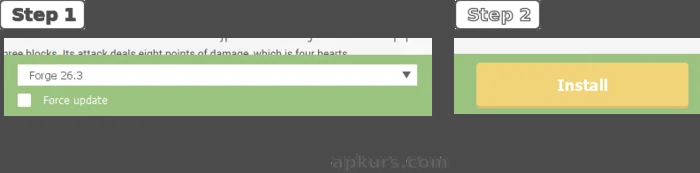
Or if you’re on Minecraft Launcher then use the method given as under
1 : Go to the official site: files.minecraftforge.net
2 : Select the exact Minecraft version you want (Forge is version-specific).
3 : Download the Installer (the .jar file).
4 : Run the installer → choose Install client.
5 : Open the Minecraft Launcher → a new Forge profile will appear in the installations list. Select it and you’re ready play.
Fabric
To install Fabric in minecraft whether you’re on Tlauncher/Minecraft Launcher the process remains the same.
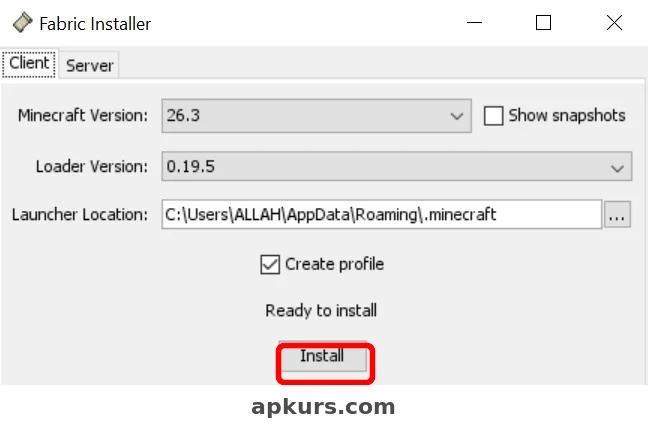
1 : Install Fabric Launcher by clicking here, close Minecraft Launcher/Tlauncher completely and then open it (make sure java is installed), after it opens the latest version and loader will be selected automatically, click install and wait a little bit till it installs.
2 : After it installs, launch Tlauncher/Minecraft Launcher and locate the version (if you set later version then you’ll find it easily) it will be named as fabricloader-version, select the version and enter the game 1 time to set it up comlpetely.
The complete guide to install Fabric/Forge is completed now lets see how to download and install mods in Minecraft.
FPS BOOST MODS for Java Edition
A lot of players notice their FPS dropping in Minecraft Java when the world starts getting full or they’re working on a big build. Lowering the graphics helps a bit but it never fully fixes it. Most people end up installing performance mods instead. On a weaker PC Sodium tends to work well and keeps things running smoother. If the computer is stronger then Optifine or a couple other optimization packs usually do the job better. These mods reduce lag, make chunks load quicker, and the game just feels less heavy overall. After using them for a while going back to normal Minecraft feels pretty rough. Here are some of FPS boost mods that help to increase fps, reduces shutters and are for stable fps :